


Page 4 - CBS ICT Scope & Sequence Grades 1-3 - V2
P. 4
Introduction to Information and Communications Technology skills – Scope and Sequence Grades 1-3


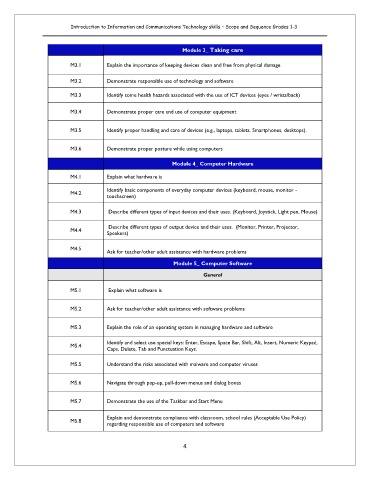
                                                             Module 3_ Taking care

                        M3.1        Explain the importance of keeping devices clean and free from physical damage

                        M3.2        Demonstrate responsible use of technology and software

                        M3.3        Identify some health hazards associated with the use of ICT devices (eyes / wrists/back)

                        M3.4        Demonstrate proper care and use of computer equipment


                        M3.5        Identify proper handling and care of devices (e.g., laptops, tablets, Smartphones, desktops).


                        M3.6        Demonstrate proper posture while using computers

                                                          Module 4_ Computer Hardware

                        M4.1        Explain what hardware is
                                    Identify basic components of everyday computer devices (keyboard, mouse, monitor -
                        M4.2
                                    touchscreen)

                        M4.3         Describe different types of input devices and their uses. (Keyboard, Joystick, Light pen, Mouse)

                                     Describe different types of output device and their uses.  (Monitor, Printer, Projector,
                        M4.4
                                    Speakers)

                        M4.5
                                    Ask for teacher/other adult assistance with hardware problems

                                                          Module 5_ Computer Software
                                                                    General

                        M5.1         Explain what software is


                        M5.2        Ask for teacher/other adult assistance with software problems


                        M5.3        Explain the role of an operating system in managing hardware and software

                                    Identify and select use special keys: Enter, Escape, Space Bar, Shift, Alt, Insert, Numeric Keypad,
                        M5.4
                                    Caps, Delete, Tab and Punctuation Keys.
                        M5.5        Understand the risks associated with malware and computer viruses


                        M5.6        Navigate through pop-up, pull-down menus and dialog boxes


                        M5.7        Demonstrate the use of the Taskbar and Start Menu


                                    Explain and demonstrate compliance with classroom, school rules (Acceptable Use Policy)
                        M5.8
                                    regarding responsible use of computers and software

                                                              4

